
Cable TV Operators
Run your local channels 24/7 with an automatic playlist, logos, tickers and scheduled ads.
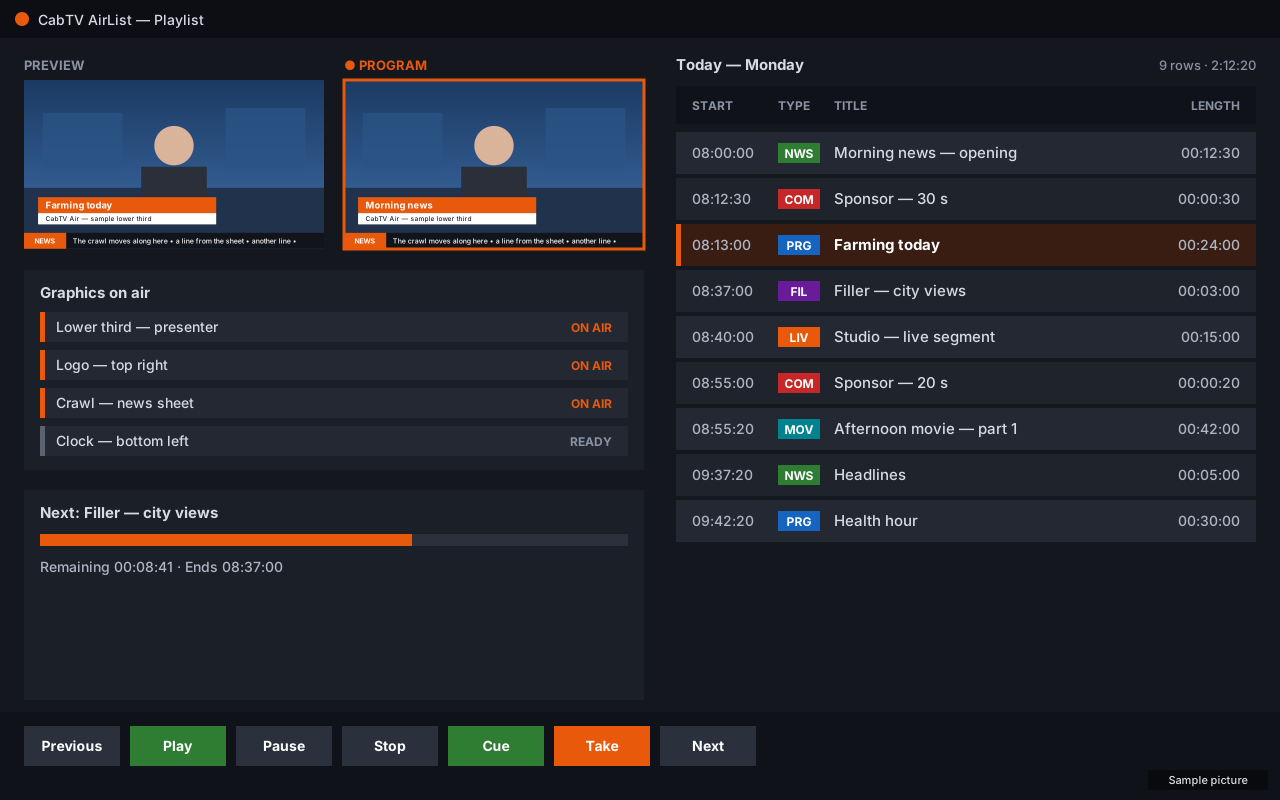
ExploreCabTV Air turns one Windows PC into a 24/7 playout station: run an automatic playlist by the clock, lay broadcast graphics and tickers over it, cut live cameras and phones, and stream to every platform at the same time.
Everything in one setupPlayout, graphics, cameras and streams
Works with
Everything on one screen
CabTV Air is a playout, graphics and live production system for your channel. It plans your day, plays it by the clock, keeps the graphics in step with every clip and lets you go live in a moment — from one window, on one PC.
Made for the air: scheduled news, movies with their breaks, prayer times at their minute, live studio segments with several cameras, tickers fed from a sheet, and streams to many platforms at once.Explore all features
Loading…
Live TV for all
Choose your kind of channel to see what CabTV Air does for it.
Run your local channels 24/7 with an automatic playlist, logos, tickers and scheduled ads.
Explore
Stream the same air to several platforms and players at once, with one playlist.
Explore
Lower thirds and crawls filled from a sheet, and live segments right inside the playlist.
Explore
Plan the week in the calendar; the day loads itself at its time, the fillers fill every gap.
Explore
Cut up to six cameras — phones too — with a program and preview, and play clips between them.
Explore
Fixed plays start the call to prayer or a service at its exact minute, over the running list.
Explore
Play recorded lessons by the timetable and go live from the classroom with a phone.
ExploreTell us about your channel and we will help you set it up.
Ask us on WhatsAppHow it works
Make your account on cabtv.app with your email address and phone.
An 8-digit code comes to your email, with the download link.
Install CabTV Air and type the code once in its registration window.
Load your clips, lay your graphics and press Play.
Questions
A Windows 10 or 11 PC (64-bit). One setup installs CabTV Air with everything it needs, and its own database: nothing else to install.
Register on this site. An 8-digit code comes to your email; type it once in CabTV Air and your PC is registered to your account.
One account registers one PC. To move CabTV Air to another PC, ask support.
Write to us on WhatsApp or by email — the tutorials answer the first questions step by step.